
Make: less app chaos.
More connected work.
Bring the tools you already use into one visual workflow. Connect a trigger, apply the right rules, and move information where it belongs.
Affiliate disclosure: Practiloom may earn a commission from eligible purchases through our links, at no additional cost to you.
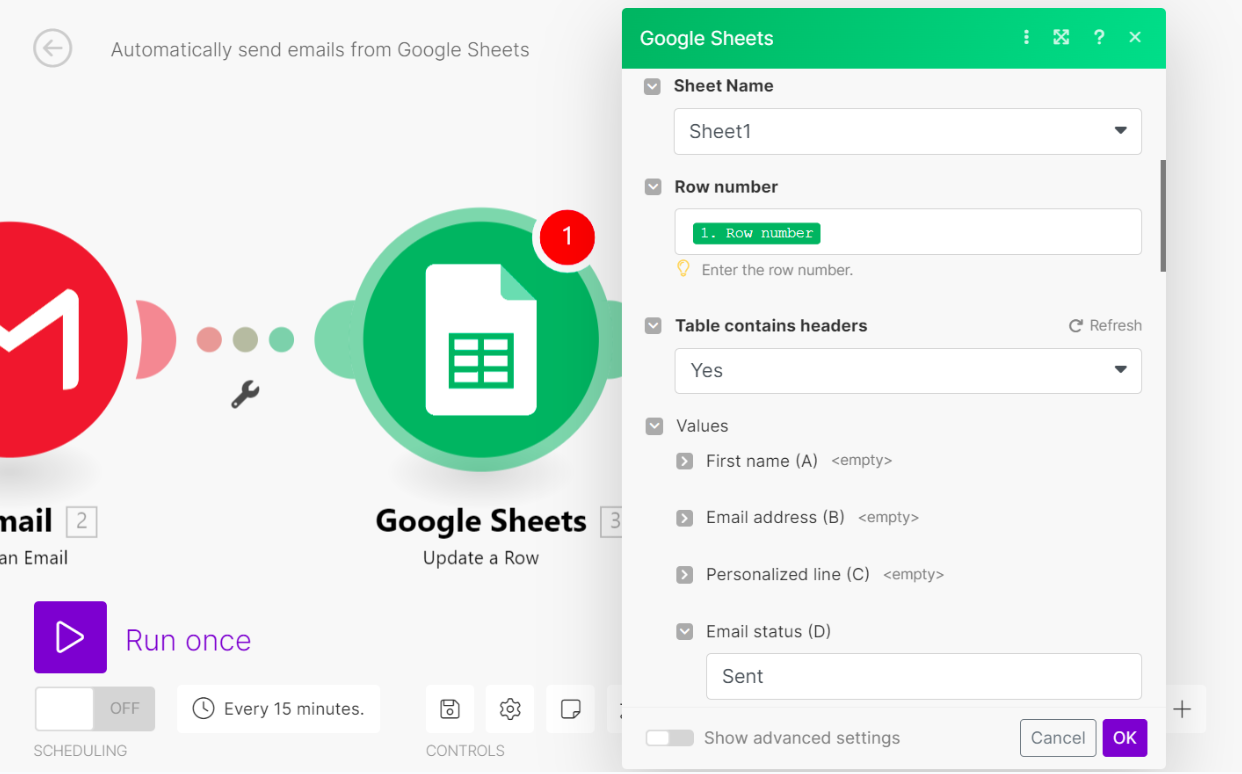 Actual Make interface · existing official screenshot in Practiloom’s media library · interface may change
Start with your apps.
Authorize the source and destination your process really needs.
Map the next step.
Pass values between modules and use filters to control which records continue.
Inspect the result.
Test the output, then choose a sustainable schedule and monitor runs.
See what you are choosing.
Make’s core is a scenario: a visual chain of triggers and actions. These screens are from our own Google Forms lead demonstration.
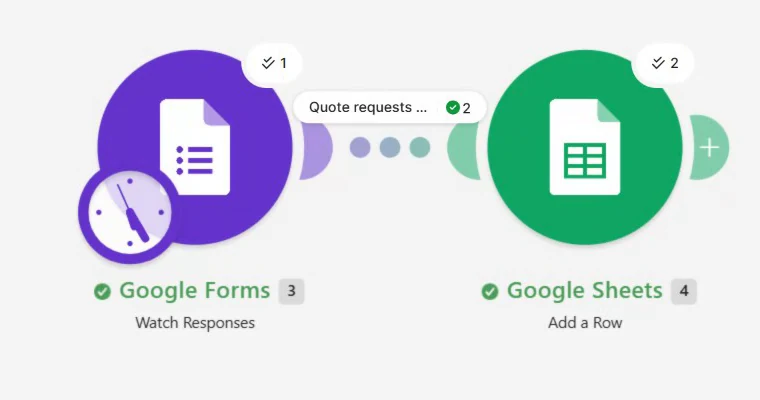
A workflow you can trace
Follow data from a trigger through a filter to its destination. Your scenario grows as you add only the actions you need.
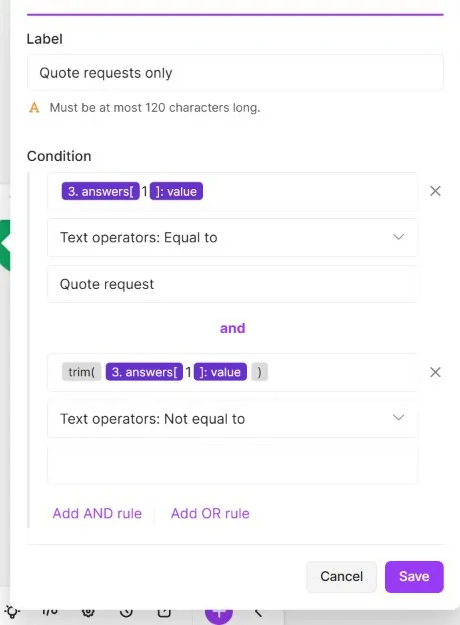
Control what moves forward
Filters can stop nonmatching records before a destination action. Field mapping and functions organize the values that do continue.
Capabilities reference: official Make product overview and filter documentation. Other capabilities described below are researched, not all independently tested by Practiloom.
Flexible building blocks.
Real setup work.
App connections
Combine supported app triggers and actions. Confirm the exact module and account permissions you need; an app being listed does not guarantee every feature is available.
Data transformation
Map earlier output into later fields, clean strings and format values. Nested collections and arrays require care: visual building does not remove data-model decisions.
Scheduling and events
Some modules poll on a schedule; others receive supported instant events. The trigger determines the behavior. Scheduling frequency and available features depend on your plan.
History and troubleshooting
Inspect scenario executions to understand failures. You still need to define monitoring, retries and duplicate handling for the business process you build.
The right request.
The right next step.
Choose an example response to see why a filter matters. This is an interactive illustration of our lead workflow—not a live Make connection.
A new customer inquiry
Request type = Quote request
Condition matchesCondition does not matchAdd a row to the lead list
No row on this route
Build around a business task.
Not another dashboard.
A cleaner list of opportunities
Collect inquiries, qualify them with a simple condition, and standardize the fields before recording the lead.
Demonstrated with fictional data in our Forms → Sheets tutorial.Put the next task with the right person
Design a handoff that categorizes incoming work and creates the next action in a supported team tool.
Concept example. Requires suitable modules, authorization and testing.Keep repeatable updates consistent
Map the values you need into a destination record, with clear formats and source labels instead of repeated copying.
Concept example. Duplicate handling and retries need their own design.Useful when your process
crosses several tools.
A good fit when…
You want to keep existing apps, connect repeatable handoffs, and control routing or formatting. You are willing to learn mapping, inspect runs and maintain connections.
Consider a simpler route when…
A native app integration already does the job, or you want a ready-made CRM rather than a workflow builder. A large scenario is a poor substitute for an agreed business process.
Advantages
Visual workflows, conditional routing and reusable app actions offer flexibility across an existing software stack. A free allowance lets you test a small use case before committing.
Tradeoffs
Polling, high record volume and extra actions consume credits. Permission changes, API limits and retries create maintenance work. “No code” still requires testing and technical judgment.
Make or an all-in-one platform?
Make connects a stack.
Choose it when the main problem is moving information between existing systems and applying custom workflow logic. It is not itself your full customer database, website builder or email service.
GoHighLevel combines customer workflows.
If your main need is a shared CRM, pipeline, booking and marketing environment, evaluate that product category first. The tools can also complement each other when the required integrations are available.
Start small.
Pay for the work you need.
Free
1,000 credits / month
- 2 active scenarios
- 15-minute minimum schedule
- Visual builder, routers & filters
Core
10,000-credit reference tier
- Unlimited active scenarios
- Scheduling down to 1 minute
- More capacity than Free
Pro
10,000-credit reference tier
- Priority scenario execution
- Custom variables
- Full-text execution log search
Teams
10,000-credit reference tier
- Teams and team roles
- Shared scenario templates
- Collaboration controls
Need a tailored arrangement?
Evaluate governance, security and organization-wide requirements with Make.
Reference USD monthly prices, confirmed against Make’s official published material. Selected credit volume, annual billing, region, taxes and current offers may change the charge. Annual billing has different terms; the figures above are not annual-equivalent rates.
Plan buttons use Practiloom’s affiliate registration link. Review and choose the applicable plan inside Make; these links do not preselect a paid subscription. No purchase is required to read our guide.
Verify current pricing → Official monthly price reference →A quiet form can still use credits.
Polling checks can consume credits when no new response arrives. Budget the checks and the downstream actions.
Questions worth answering first.
Can I use Make without writing code?
Many workflows use app modules, filters and mapping. You still need to understand the incoming data and test each action. Some advanced integrations may need API or coding knowledge.
Is Make a replacement for a CRM?
Its core role is connecting systems and automating processes. If you need a customer database and pipeline, select that system and decide where Make adds useful connections.
Does the Free plan cover ongoing automation?
It depends on checking frequency, volume, steps and other scenarios sharing the allowance. A permitted 15-minute interval can exceed 1,000 credits over a full month even before downstream actions.
What should I verify before a real launch?
Required modules, account access, expected volume, credit usage, error recovery, duplicate policy and customer-data handling. Do not assume a successful small test covers all of these.
See if Make fits.
Then build one useful workflow.
Explore the platform, then follow our real quote-request example. Keep the first scenario small enough to understand and verify.
Choose the tool.
Then make it useful.
Build a filtered lead list
Follow our actual Google Forms → Make → Google Sheets demonstration, including the mapping, filter and test limits.
Plan your first automation
Choose a small process, identify its trigger and destination, and define a result you can verify.
Make or systeme.io?
Understand the difference between connecting an existing app stack and using a platform centered on funnels and marketing.
Browse the Tool Library for other software picks, or explore all Practiloom guides.