Connect your apps.
Get your time back.
Make turns repetitive steps into visual workflows. This research-based guide explains what it can automate, how to build your first scenario, what credits actually mean—and when not to use it.
Affiliate disclosure: Practiloom may earn a commission if you purchase through our referral link, at no additional cost to you. This guide uses official documentation; it is not a claim of independent hands-on testing.
Make is the glue between
your everyday tools.
A Make scenario is a workflow that moves information between applications. Instead of copying the same details from a form into a spreadsheet and sending a notification manually, you can describe the steps once and let the scenario handle them.
Something happens
A new form response arrives, a spreadsheet row is created, or a webhook receives data.
Data gets organized
Map fields, apply conditions, format values or branch into separate routes.
The next step runs
Create a record, send a message, update a database or pass information to another app.
Stop copying every new lead by hand.
Imagine someone fills out a lead form. Your workflow creates a row in a shared spreadsheet, then alerts the appropriate person. If you later add conditions, only leads matching your criteria receive certain notifications.
This is a proposed workflow, not an independently tested template. Actual app connections, permissions and available modules vary.
Illustration designed for learning. No live customer information is displayed.
Simple enough to start.
Powerful enough to grow.
The important question is not how many integrations exist, but whether the specific apps and actions your process needs are supported.
Visual scenario builder
Connect modules in a visual canvas and see the order in which data moves through a workflow.
Routers and filters
Split one process into different paths and allow only matching records through a branch. Routers themselves do not consume credits.
Webhooks and schedules
Start workflows when an external event arrives or check for changes on a schedule. Scheduling frequency depends on your plan.
Error handling and history
Inspect executions and configure responses to failed steps, rather than assuming every automation will run flawlessly.
AI-assisted workflows
Connect supported AI services for tasks such as classification or text processing. AI features may have separate credit requirements and provider costs.
Reusable building blocks
Start with an official template or a tiny two-module scenario, then add logic only when a real need appears.
Build your first scenario,
one step at a time.
Use the official beginner course alongside this checklist. Make Academy's free “Setting up my first scenario” course is designed for newcomers and estimates 60–90 minutes. The exercise below is a simplified learning plan, not a measured test by Practiloom.
1. Pick a small task with a clear result
For practice, choose a safe workflow such as reading data from one supported app and creating a row in a test spreadsheet. Avoid real customer data and financial actions while learning.
2. Create a scenario and choose the trigger
Inside Make, create a new scenario. Search for your source app and select the relevant trigger module. A trigger determines when the process starts, whether by polling or an instant event.
3. Connect the source account
Authorize only the access required for the test. Check the permissions requested by the integration and confirm you're using the intended account.
4. Add a second module
Choose the destination app and action. For example, map an incoming name and timestamp into spreadsheet columns. In Make, mapping is how data from earlier modules is passed to later ones.
5. Run once and inspect the output
Use the scenario's test run to inspect what each module received and returned. If the destination record is wrong, fix the field mapping before enabling repeated runs.
6. Set a schedule—or use an instant trigger
For scheduled scenarios, the Free plan has a minimum 15-minute interval. Instant webhooks can react when a supported external event arrives; they follow different execution behavior.
7. Add guardrails before real use
Think about duplicates, missing fields, API rate limits, failed connections and whether an error could create an unwanted action. Use filters, error handling and execution history as appropriate.
The first link is an affiliate link. Make Academy is a non-affiliate educational resource.
What does Make really cost?
Make charges by credits. Most module actions use one credit, but certain advanced features may use more. A scenario that processes many records can consume many credits in a single run. Pricing below reflects the provider's published pricing page checked in October 2026; verify it before purchasing.
| Plan | Listed monthly price* | Best starting point | Important detail |
|---|---|---|---|
| Free | $0 | Learning and small workflows | 1,000 credits/month, 2 active scenarios, 15-minute minimum schedule interval |
| Core | $9 | Regular workflows | Price shown for 10,000 credits/month; unlimited active scenarios and faster scheduling |
| Pro | $16 | Advanced individual users | 10,000-credit reference tier; adds priority execution and advanced management features |
| Teams | $29 | Collaborating teams | 10,000-credit reference tier; team roles and shared templates |
| Enterprise | Custom quote | Complex organizations | Additional governance, security and support options |
*Indicative provider-listed USD monthly figures for the 10,000-credit selection where applicable; billing frequency, region, taxes, selected credit volume and promotions can change the actual price. Source: official Make pricing.
A simple credit calculation
Suppose a scenario performs three billable module actions per successful run and runs 100 times in a month. That is roughly 300 credits before extra searches, retries, iterators or other billable actions. This is an illustrative calculation, not a guaranteed invoice. Check the execution log and credit meter to measure your own workflow.
When should you upgrade?
Not on day one. First establish a reliable workflow, track how often it runs and compare your actual usage against the Free plan's credit and scheduling limits. Upgrade only when a specific constraint prevents the process from working as needed.
Who should use Make?
Who probably shouldn't?
Solo operators
People moving data between several apps, updating spreadsheets or coordinating repetitive steps.
Small teams
Teams handling leads, alerts, reporting and repeatable multi-app processes that need visibility.
Single-app tasks
If one app already provides a reliable native automation, an extra integration platform may add complexity.
Where Make is compelling
- A visual builder makes the logic of a workflow easier to inspect than a hidden sequence of scripts.
- Routers, filters, scheduling and webhooks support more than simple one-step connections.
- The permanent free tier offers a low-commitment way to learn.
- Official Academy lessons, help documentation and templates reduce the need to learn from scattered tutorials.
Where you need to be careful
- Credits can grow faster than expected when processing multiple records or retrying failures.
- Connections depend on external APIs, app permissions and service availability.
- Multi-branch scenarios can become difficult to debug without clear naming and documentation.
- Automation of sensitive information requires deliberate access control and data-handling choices.
These are practical evaluation considerations grounded in platform behavior and documentation, not claims from an independent performance benchmark.
Make vs systeme.io: not the same category
Make is a cross-app automation platform. systeme.io is an online-business platform focused on funnels, email and selling digital offers. They can complement each other, but choosing between them depends on the job you're trying to accomplish. Read the side-by-side comparison →
Frequently asked questions.
Is Make free forever?
The provider advertises a Free plan with no time limit. It has limits, including 1,000 monthly credits and two active scenarios, so verify current conditions on the pricing page.
Do I need to know how to code?
No. The visual builder is designed for no-code workflows. Advanced integrations, APIs and data transformations can still benefit from technical knowledge.
What is a scenario?
A scenario is a connected workflow of modules that takes information from one app or event and performs actions in another.
What happens when credits run out?
According to Make's pricing FAQ, scenarios stop running until credits are added or the allowance renews; incoming webhook events may queue within applicable limits.
Are Make and Zapier the same?
They are both automation platforms, but differ in interfaces, pricing models, integrations and workflow design. Compare the specific workflow you need rather than assuming one is universally cheaper or better.
Can I use Make with AI tools?
Yes, Make supports AI-related apps and features. Available modules, provider fees and credit consumption depend on the integration and plan.
Did Practiloom personally test Make?
This page is an editorial research guide based on official documentation, not a hands-on benchmark. We distinguish illustrative examples from verified product specifications.
Free resources worth bookmarking.
Make Academy
Structured lessons for beginners, including scenarios, app connections and mapping.
Start the beginner course ↗Template gallery
Explore existing automation patterns and adapt a relevant template to your own apps.
Browse templates ↗Help Center
Read about webhooks, routers, scheduling, error handling and scenario settings.
Open documentation ↗Source review: official Make pricing, Make Academy, and Make Help Center, October 2026. Product details may change after publication.
Automate one task.
Then build on what works.
Don't start with a complicated AI agent. Start with a trigger, one useful action and a test you can verify. Make's free plan gives you room to explore before deciding whether a paid tier is justified.
Affiliate disclosure: if you purchase through the referral link, Practiloom may receive a commission at no additional cost to you. Provider terms determine eligibility.
Inside Make: the real scenario editor
Explore real interface screenshots published by the software providers. These are product reference images, not screenshots from a Practiloom hands-on test.
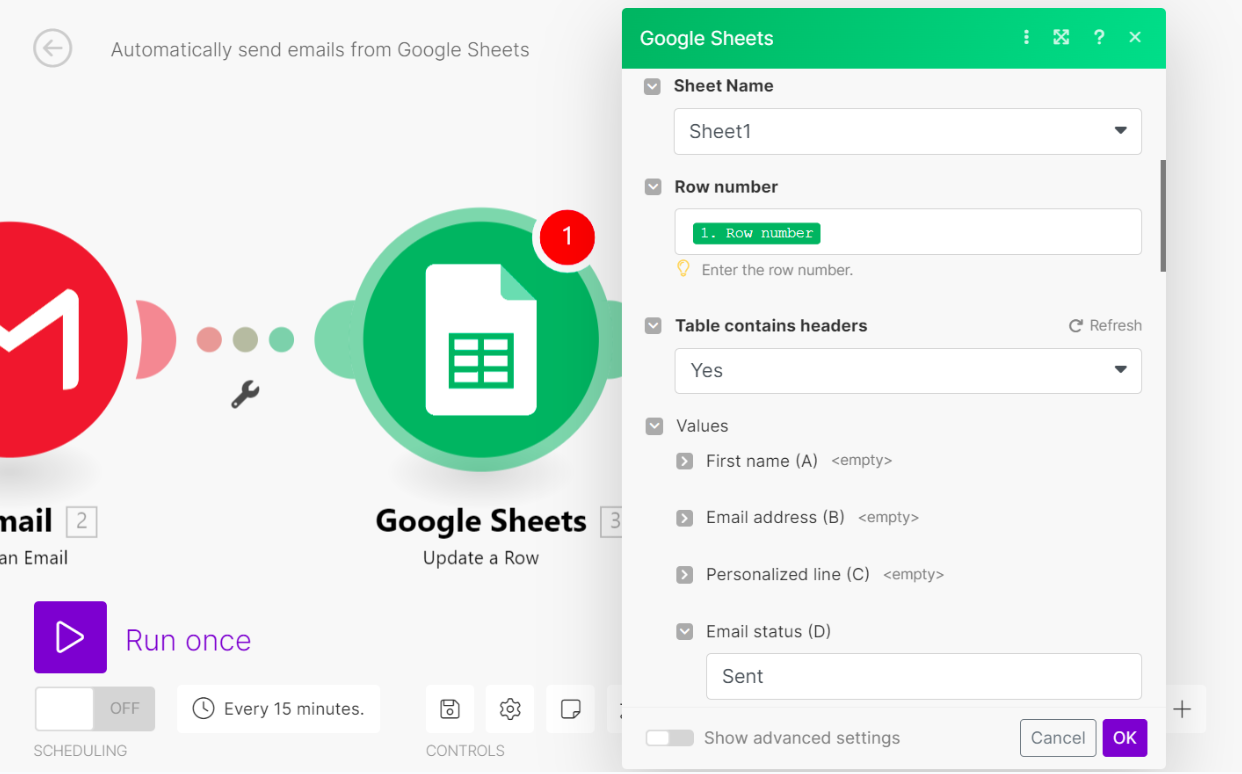
See the workflow before you build it.
Two practical, original visual examples to help you understand the underlying workflow. These are educational illustrations, not screenshots or claims of hands-on testing.
Connect the work, not the busywork.
See how a simple event can move through a visual automation, with a trigger, a decision and an action.
Explore the Make walkthrough ↗One clear next step.A focused page designed around a single action.Your email addressGet the free guide →
Build a simple funnel.
Picture the visitor journey from landing page to signup and a thoughtful follow-up sequence.
Explore the systeme.io walkthrough ↗