Build your first
sales funnel.
Without the chaos.
Want a landing page, email follow-up and a simple way to test an online offer? Here's what systeme.io actually does, how the pieces fit together and what to try before paying.
Affiliate disclosure: we may earn a commission if you purchase through our link, at no additional cost to you. This is a research-based guide, not a hands-on product review.
What does systeme.io actually do?
It's an all-in-one online business platform. Instead of stitching together separate tools for a landing page, subscriber list and email sequence, you can manage those parts in one place. It also supports courses, digital products, affiliate programs and other business features. That doesn't mean everyone needs every feature.
Create a page
Give visitors one clear reason to sign up, book or buy. Keep the offer and next action obvious.
Collect interest
Connect a signup form to your contact list. Ask only for information you genuinely need.
Send the next step
Use an automated email to deliver what you promised and explain what happens next.
Imagine you're selling a small digital guide.
You offer a free checklist in exchange for an email address. A visitor lands on your page, signs up and receives the checklist automatically. Later, you can introduce a paid product to people who opted in to hear from you.
That is a simple funnel. You don't need a complicated sales machine to test whether people want your offer.
Custom educational illustration. No live signup or form submission on this page.
One small workflow.
Three useful outcomes.
The value isn't the number of features. It's the ability to connect the right steps without constantly moving data between unrelated tools.
Landing pages and funnels
Build opt-in and sales journeys using a page editor and predefined funnel structures. Focus on one conversion goal per page.
Email marketing
Keep subscriber information alongside your funnel and send campaigns or automated follow-ups.
Automation rules
Use a signup event as a trigger, then send an email or add a tag. Review plan-specific limits before scaling.
Digital product delivery
Courses and digital offers can live in the same ecosystem, reducing the number of services to configure.
Your first funnel in
about 15 minutes.
This is a suggested starter exercise, not a measured completion time or a report of our own testing. The goal is to build a working example with dummy information and verify every step.
Optional video walkthrough by Mindly Nova (third-party creator). Not produced or tested by Practiloom. Prefer the official systeme.io training library for provider-led lessons and current interface guidance.
Step 1 — Choose one outcome
Use a fictional free checklist as your offer. Write a headline that promises one specific benefit and a short explanation of what the subscriber will receive.
Step 2 — Create an opt-in funnel
Open the funnels area in systeme.io, create a new funnel and choose an opt-in style page. Pick a simple template and remove sections that distract from the signup.
Step 3 — Edit the landing page
Replace placeholder text with your offer. Check the mobile view and make sure the signup form is connected to the appropriate funnel step.
Step 4 — Add a follow-up rule
In the funnel step's automation rules, add a trigger for Funnel step form subscribed and an action to Send email. Write a short welcome message that delivers the promised next step. This is the workflow described in systeme.io's help documentation.
Step 5 — Test the entire journey
Submit the form using a test email address you control. Check that the contact appears correctly, the email arrives and the message content is accurate. Verify the behavior on a phone. Don't use real customer data during the experiment.
Step 6 — Decide whether to continue
If the flow works, consider whether it saves you effort and supports a real offer. Only then evaluate whether a paid plan would solve a specific limitation.
Affiliate link. Creating an account is optional; verify the current terms with systeme.io.
Can you actually start free?
Yes. According to the provider's published pricing information, systeme.io offers a permanent free tier with a limit of 2,000 contacts and access to core features. Specific limits for funnels, rules, workflows and other features depend on the plan and may change.
| Decision | What to check | Practical advice |
|---|---|---|
| Trying the platform | Free-tier limits and available integrations | Build one complete test journey before paying |
| Growing your audience | Contact caps, tags, campaigns and automation limits | Upgrade only when you hit a genuine constraint |
| Selling a product | Checkout options, payment availability, taxes and refund terms | Test the purchase and delivery process end to end |
| Switching platforms | Export options, domain settings and migration effort | Consider lock-in and ongoing maintenance |
Pricing and limits should be checked on the official pricing page before any purchase. This link is informational, not an affiliate link.
Who is it for—and who should skip it?
Solo creators
Someone validating a newsletter, downloadable resource, small course or digital offer without a complicated technology stack.
Small businesses
Teams that need simple lead capture and follow-up in one system, subject to integration and regional requirements.
Complex operations
Organizations needing specialized enterprise CRM, sophisticated multi-system workflows or advanced custom engineering.
What we like about the approach
- The free entry option reduces the risk of exploring the platform.
- Landing pages, contacts and email follow-up are connected conceptually.
- A beginner can focus on a single journey rather than assembling many subscriptions.
What we'd investigate carefully
- Whether the editor offers enough design flexibility for your specific brand.
- How well the available integrations match your existing stack.
- How export, migration and account ownership work if you leave.
- Whether the free plan's automation and contact limits fit your growth expectations.
These are evaluation points, not claims based on a hands-on benchmark. We have not independently tested systeme.io's reliability, support response times or email deliverability.
Alternatives worth comparing
If you only need email newsletters, a dedicated email platform may be enough. If you already use WordPress, adding a focused form and email service could be more flexible. If your main need is connecting many third-party apps, a dedicated automation platform such as Make solves a different problem. Read our Make vs systeme.io decision guide →
Before you create an account.
Is systeme.io really free?
The provider advertises a permanent free plan with limits. Verify the current feature caps and pricing on its official website before signing up.
Do I need to know how to code?
Its landing-page and funnel tools are designed for visual editing. More complex integrations and customization may require additional technical work.
Can I create a funnel and send emails in the same platform?
Yes. The provider documents funnel-step signup triggers and email actions, allowing a basic opt-in and follow-up sequence.
Should I upgrade immediately?
No. Test one real use case first, then compare the limits you actually encounter with the available plans.
Is this a sponsored review?
Practiloom has an affiliate referral link and may earn a commission from qualifying purchases. This article is an editorial introduction based on research and official documentation, not a hands-on review or a paid placement.
Don't buy another tool.
Try a useful workflow.
Build one landing page, collect one test signup and verify one follow-up email. If the process solves a real problem, you'll have a reason to go further.
Affiliate disclosure: we may receive a commission if you purchase through our link, at no additional cost to you. Product terms and availability are determined by systeme.io.
Inside systeme.io: the real funnel builder
Explore real interface screenshots published by the software providers. These are product reference images, not screenshots from a Practiloom hands-on test.
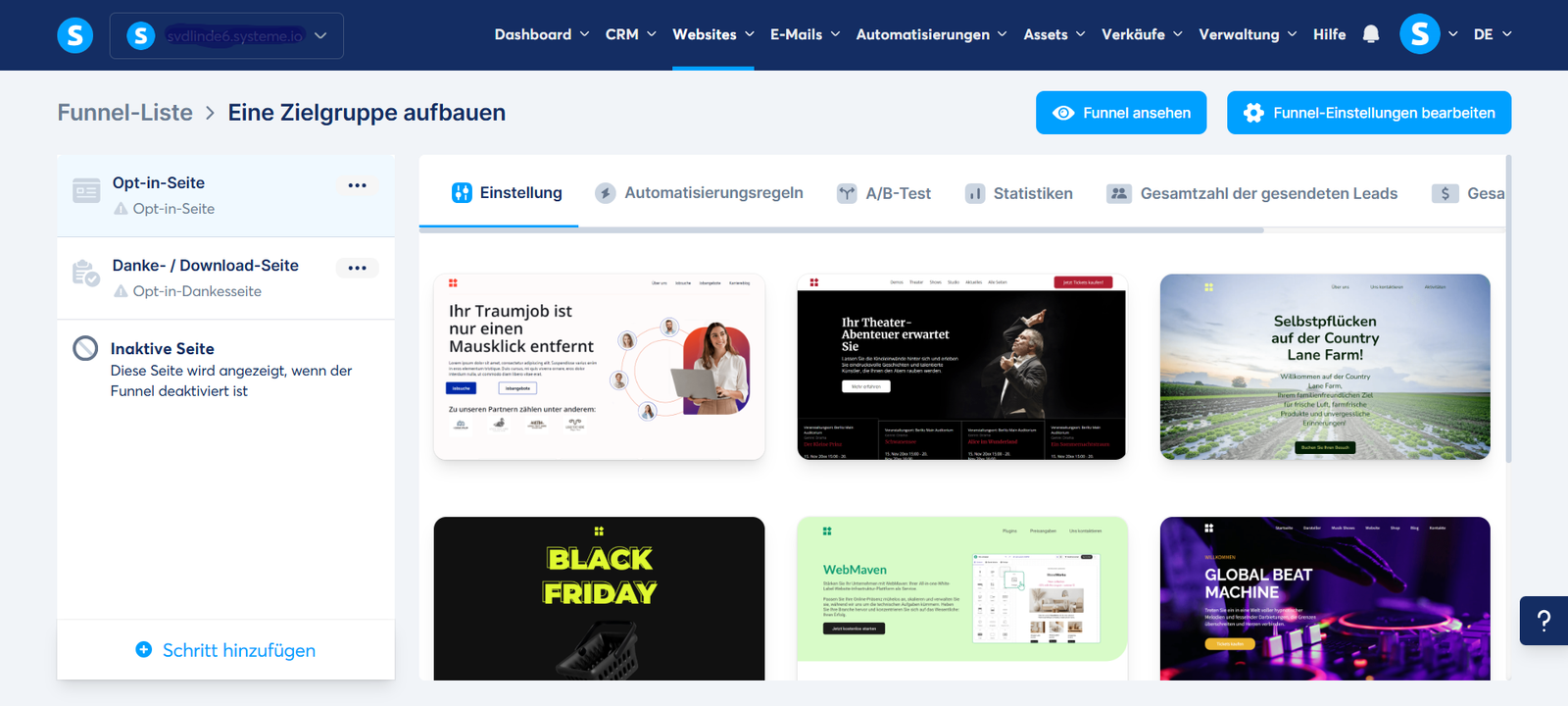
See the funnel before you build it.
Two practical, original visual examples to help you understand the underlying workflow. These are educational illustrations, not screenshots or claims of hands-on testing.
One clear next step.A focused page designed around a single action.Your email addressGet the free guide →
Build a simple funnel.
Picture the visitor journey from landing page to signup and a thoughtful follow-up sequence.
Explore the systeme.io walkthrough ↗Connect the work, not the busywork.
See how a simple event can move through a visual automation, with a trigger, a decision and an action.
Explore the Make walkthrough ↗